Prepare your Excel data source for a mail merge in Word for Mac
You've built a contact list that you want to use for a mail merge. If your contacts are in an Excel spreadsheet, format any ZIP Code or postal code as text so that you don't lose any data when you run a mail merge. If you're importing your contacts from a text (.txt) or a comma-separated value (.csv) file into a new spreadsheet, the Text Import Wizard will help you import and format your data.
Step 1: Set up your data source in Excel
If you're already using an Excel spreadsheet as your data source for a mail merge in Word, go to Step 2 in this topic. If the data source is a .txt or a .csv file that contains your Gmail contacts, for example, use the Text Import Wizard to set up your data inExcel.
-
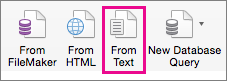
Open Excel, and on the Data tab, choose From Text.
-
Choose the .csv or .txt file you want, and then choose Get Data.
-
In the Text Import Wizard, choose Next.
-
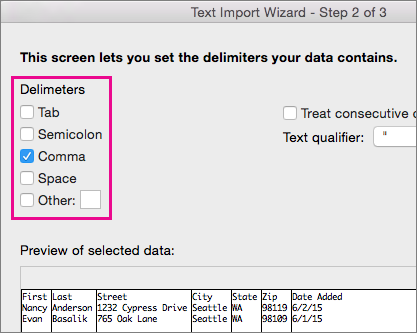
Under Delimiters, select the check box that matches the delimiter (such as a tab or comma) your data uses, and then choose Next.
Tip: The Preview of selected data pane shows you what the results will look like in a table format.
-
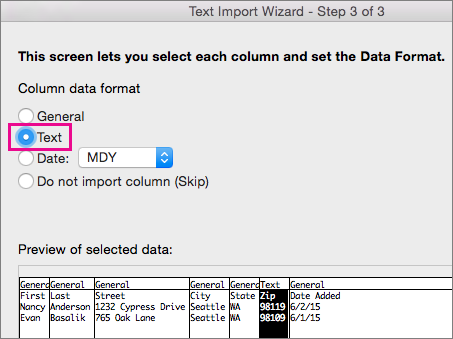
Under Preview of selected data, choose the column that contains ZIP Codes or postal codes, and then, under Column data format, choose Text
-
Repeat step 5 as necessary, choosing the column you want to change and the data format you want to apply.
Note: Each time you apply a data format to a column, the name of the format appears in the table header for that column.
-
Choose Finish.
-
In the Import Data dialog box, select where you want Excel to put your data, and then choose OK.
Note: Save your spreadsheet with a new file name.
Step 2: Format numerical data in Excel spreadsheet
To make sure your ZIP Code or postal code comes through a mail merge without losing any zeros, format the column for the codes as text.
-
Open your spreadsheet and select the column that contains the ZIP Codes or postal codes.
-
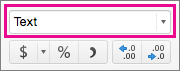
On the Home tab, in the Format box, choose Text.
You can use your prepared data for mail merge.

No comments:
Post a Comment