Quick Reference: Start or Join an IM Conference
You can select multiple contacts or a group in your Contact List to start an IM conference. You can also escalate a one-to-one IM session to a group conference by simply inviting other contacts to an IM session.
Start an IM conference

| How to | |
| Start an IM conference with multiple contacts | In the Contact List, hold the CTRL key and select the contacts you want to invite. Right-click the last contact and then click Send an Instant Message. Type your message in the Message Entry box, and then press ENTER. |
| Start an IM conference with a group | In the Contact List, right-click a group name, and then click Send an Instant Message. Type your message in the Message Entry box and then press ENTER. |
| Invite someone to an IM session or conference | In the Conversation window, click Invite, and then select the contacts you want to invite. |
Join an IM conference
| How to | |
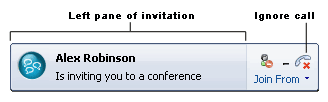
| Join an IM conference | In the conference invitation alert, click the left pane. The alert appears in the bottom right of your computer screen. |
| Slide 6 of 11 |
For more information see Send an Instant Message to a Group.

No comments:
Post a Comment