Apply your custom theme color
Which Office program are you using?
Word
You can create a customized color scheme, also known as theme colors, in PowerPoint and use it in other Office applications.
Note: Theme colors work more effectively when text is formatted by applying styles. For more information about how to apply a style, see Apply, change, create, or delete a style.
-
Open the document that you want to apply the new theme color to.
-
On the View menu, click Publishing Layout.
-
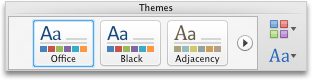
On the Home tab, under Themes, click Colors, and then click the theme color that you created.
See also
Excel
You can create a customized color scheme, also known as theme colors, in PowerPoint and use it in other Office applications.
Note: Theme colors work more effectively when text is formatted by applying styles. For more information about how to apply a style, see Apply, create, or remove a cell style.
-
Open the workbook that you want to apply the new theme to.
-
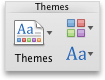
On the Home tab, under Themes, click Colors, and then click the theme color that you created.

No comments:
Post a Comment